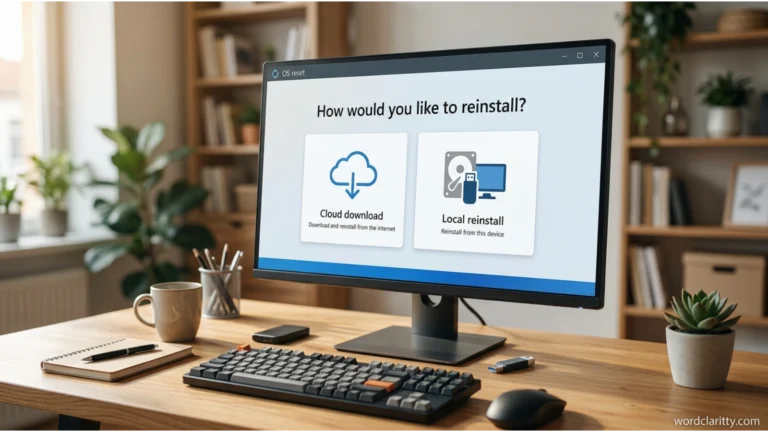
When resetting a Windows computer, you may see two options: Local Reinstall and Cloud Download. Both options reinstall Windows, but they work differently. This can confuse English learners, beginners, and even experienced computer users who are unfamiliar with technical terms.
Should you choose local reinstall or cloud download? Which option is faster, safer, and better for your computer? The answer depends on your internet connection, the condition of your Windows installation, and your personal needs. Understanding the difference helps you make the right decision, avoid unnecessary downloads, and reset your Windows 10 or Windows 11 computer with greater confidence.
Why Local Reinstall and Cloud Download Are Confusing
Local reinstall and cloud download are two options available through the Windows Reset this PC feature.
Both methods aim to reinstall Windows, which makes their differences less obvious.
1. Similar Pronunciation
The expressions do not have the same pronunciation, but both contain technical words that may be unfamiliar to English learners.
Their approximate pronunciations are:
- Local reinstall: LOH-kul ree-in-STAWL
- Cloud download: KLOWD DOWN-lohd
The words sound different, but learners may confuse their meanings because both describe software installation processes.
2. Similar Spelling
The expressions are not spelled similarly.
However, both contain two words and refer to reinstalling an operating system.
“Local” means something available on or near your own device.
“Cloud” refers to remote computer systems accessed through the internet.
“Reinstall” means to install software again.
“Download” means to transfer data from another computer or server to your device.
Understanding these individual words makes the full expressions easier to remember.
3. Context Confusion
Both options appear during the same Windows reset process.
For example, Windows may ask:
“How would you like to reinstall Windows?”
You can then choose:
- Cloud download
- Local reinstall
Because both options produce a reinstalled Windows system, users may assume they are identical.
However, their installation sources are different.
4. Common Learner Mistakes
Common misunderstandings include:
- Thinking local reinstall requires an internet connection.
- Assuming cloud download stores Windows permanently in the cloud.
- Believing cloud download automatically saves personal files.
- Thinking local reinstall always removes everything.
- Assuming cloud download automatically installs every available Windows update.
- Believing one method is always faster than the other.
The key is understanding where Windows obtains the files needed for reinstallation.
Local Reinstall vs Cloud Download Explained Simply
Local reinstall means Windows uses files already available on your computer to reinstall the operating system, while cloud download means Windows downloads fresh installation files from Microsoft over the internet.
Both methods are designed to reinstall Windows through the Reset this PC feature.
However, the source of the installation files is different.
Simple Explanation
Imagine you want to reinstall an application.
You have two choices:
- Use installation files already saved on your computer.
- Download new installation files from the internet.
The first choice is similar to local reinstall.
The second choice is similar to cloud download.
One-Line Distinction
Local reinstall = Reinstall Windows using local files.
Cloud download = Reinstall Windows using files downloaded from Microsoft.
Two Example Sentences
- “I selected local reinstall because my internet connection was slow.”
- “She chose cloud download because she wanted fresh Windows installation files.”
Which Is Correct?
Both expressions are correct English and official Windows reset options.
Choose local reinstall when your existing Windows files are usable and you want to avoid a large download.
Choose cloud download when local installation files may be damaged or when you prefer downloading fresh files from Microsoft.
Neither method is automatically better in every situation.
Understanding Homophones in English
Learning technical English also involves understanding words that sound similar but have different meanings.
What Are Homophones?
Homophones are words that have the same pronunciation but different meanings. They may also have different spellings.
For example:
- File: A document or collection of information stored on a computer.
- Phial: A small container, usually made of glass.
In many varieties of English, these words sound alike but have completely different meanings.
Example sentences:
“I saved the file on my computer.”
“The scientist placed the liquid in a phial.”
Why Homophones Cause Confusion
Homophones can confuse English learners because pronunciation does not always reveal meaning.
For example:
“Please write your password carefully.”
“The answer is right.”
“Write” and “right” sound the same but have different meanings.
However, local reinstall and cloud download are not homophones.
They are technical expressions with different pronunciations.
Their confusion comes from their related functions rather than similar sounds.
What Does Local Reinstall Mean?
Definition and Core Meaning
Local reinstall is a Windows recovery option that reinstalls the operating system using files already available on your computer.
Instead of downloading a fresh set of Windows installation files from Microsoft, Windows uses its existing local resources to rebuild the installation.
This method is useful when you want to reset your computer without relying on a large internet download.
For example, suppose your laptop has become slow and you want to reinstall Windows.
If the necessary local files are usable, you can select local reinstall.
Windows then attempts to complete the reset using those files.
Main Features of Local Reinstall
- Uses Windows files already available on the device.
- Normally does not require downloading Windows installation files.
- Can work without an internet connection.
- May be convenient with limited internet data.
- Can be faster when internet speeds are slow.
- May fail if necessary local system files are damaged or missing.
- Works with the available Reset this PC options.
Local reinstall does not mean that Windows simply returns to its previous condition.
It performs a reinstallation using locally available resources.
Origin and Historical Use
The word “local” comes from the Latin word localis, meaning “relating to a place.”
In computing, “local” describes something available directly on a computer or within a nearby system.
The word “reinstall” combines the prefix “re-,” meaning “again,” with “install.”
Together, the expression means installing software again using resources available on the device.
Earlier Windows recovery methods often relied on installation discs, USB drives, or dedicated recovery partitions.
Modern Windows recovery features introduced more convenient ways to reset and reinstall the operating system.
Local reinstall is one of these options.
Modern Usage and Synonyms
Today, local reinstall appears in Windows 10 and Windows 11 recovery settings.
Related expressions include:
- Local Windows reinstallation
- Reinstalling Windows from local files
- Local recovery
- Offline Windows reinstallation
- Resetting Windows using local resources
These expressions describe similar ideas, although they are not always exact technical substitutes.
When Should You Use Local Reinstall?
Local reinstall is often a practical choice when:
- Your internet connection is slow.
- You have limited internet data.
- Windows is functioning well enough for its local recovery files to be used.
- You want to avoid downloading several gigabytes.
- You prefer a reset that does not depend on Microsoft’s download servers.
However, if local system files are corrupted, this method may not complete successfully.
Example Sentences Using Local Reinstall
- “I chose local reinstall because I had no internet connection.”
- “Local reinstall uses files already available on the computer.”
- “The technician recommended local reinstall for a routine Windows reset.”
- “Local reinstall may fail if important system files are damaged.”
- “My laptop completed the local reinstall without downloading Windows from the internet.”
These examples demonstrate how the term is used naturally in technical English.
What Does Cloud Download Mean?
Definition and Core Meaning
Cloud download is a Windows recovery option that downloads fresh Windows installation files from Microsoft and uses them to reinstall the operating system.
Unlike local reinstall, this method depends on an internet connection.
It can be especially useful when the files needed for a local reinstall are damaged or unavailable.
For example, imagine your computer has repeated Windows errors and its local recovery files are corrupted.
Cloud download may help because it obtains replacement installation files from Microsoft’s servers.
However, it does not guarantee that every computer problem will disappear.
Main Features of Cloud Download
- Downloads Windows installation files from Microsoft.
- Requires a working internet connection for the download.
- Uses several gigabytes of internet data.
- Can help when local installation files are corrupted.
- May take longer on slow connections.
- Reinstalls Windows rather than running it from the cloud.
- Does not automatically preserve personal files.
- Does not necessarily install every latest Windows update.
Microsoft commonly indicates that cloud download may use more than 4 GB of data, although the exact amount can vary.
Origin and Historical Context
The word “cloud” originally refers to visible masses of water droplets or ice crystals in the sky.
In computing, cloud refers to remote servers and services accessed through a network, usually the internet.
“Download” means transferring information from a remote system to a local device.
Therefore, “cloud download” describes obtaining files from remote servers.
Microsoft introduced the cloud download reset option in Windows 10 version 2004, released in 2020.
This feature gave users another way to reinstall Windows without needing a separate installation disc or USB drive.
Modern Usage and Synonyms
Cloud download is commonly discussed in Windows troubleshooting guides and technical support conversations.
Related expressions include:
- Cloud-based Windows reinstallation
- Downloading Windows from Microsoft
- Online Windows reinstallation
- Internet-based recovery
- Reinstalling Windows using cloud files
These expressions communicate similar ideas, although “Cloud download” is the specific Windows option name.
When Should You Use Cloud Download?
Cloud download is often useful when:
- Local Windows recovery files may be damaged.
- Local reinstall has failed.
- You have a reliable internet connection.
- You have enough available internet data.
- You want Windows to download fresh installation files.
- You are troubleshooting certain Windows installation problems.
Remember that cloud download cannot repair every issue.
For example, a failing storage drive or serious hardware problem may require separate attention.
Example Sentences Using Cloud Download
- “I selected cloud download because my local Windows files were corrupted.”
- “Cloud download requires an internet connection.”
- “The computer downloaded Windows installation files from Microsoft.”
- “Cloud download may take longer when internet speeds are slow.”
- “She used cloud download after the local reinstall failed.”
These sentences show how to use the expression correctly.
Local Reinstall vs Cloud Download: Key Differences at a Glance
The following table summarizes the meanings and common uses of both expressions.
| Word | Part of Speech | Meaning | Example Context |
|---|---|---|---|
| Local reinstall | Noun phrase | Reinstalls Windows using local files | Resetting a laptop without a large download |
| Cloud download | Noun phrase | Downloads Windows files from Microsoft for reinstallation | Reinstalling Windows with fresh downloaded files |
| Local reinstall | Noun phrase | Uses resources already on the computer | Limited internet access |
| Cloud download | Noun phrase | Uses internet-based installation files | Damaged local Windows files |
Detailed Comparison
| Feature | Local Reinstall | Cloud Download |
|---|---|---|
| Installation source | Files on your computer | Microsoft’s servers |
| Internet requirement | Normally not needed | Required for download |
| Internet data usage | No large Windows download | Several gigabytes |
| Speed | Depends on local system performance | Depends on download and installation speed |
| Corrupted local files | May cause failure | Can help bypass damaged local files |
| Fresh downloaded files | No | Yes |
| Windows installation | Reinstalled locally | Reinstalled locally after download |
| Personal file options | Keep my files or Remove everything | Keep my files or Remove everything |
| Best suited for | Limited internet and usable local files | Reliable internet and suspected local file problems |
Which Option Is Better for Windows 11?
For a normal Windows 11 reset, local reinstall can be convenient if your system files are usable.
However, cloud download is often preferable when you suspect that local installation files are damaged.
The better choice depends on your circumstances.
How to Remember the Difference Between Local Reinstall and Cloud Download
Remembering these two expressions becomes easier when you connect them with everyday examples.
1. Local Means Already Here
Think of “local” as something already available on your computer.
For example, a photo saved on your laptop is a local file.
Similarly, local reinstall uses files already available on the device.
Memory trick: Local = Files already here.
2. Cloud Means From the Internet
Think of cloud storage services, where information is stored on remote servers.
Cloud download works on a related principle.
Your computer obtains Windows installation files from Microsoft’s servers.
Memory trick: Cloud = Files downloaded from the internet.
3. Associate Local With No Large Download
If you want to avoid downloading several gigabytes, local reinstall may be suitable.
Remember:
Local reinstall → Local files → No large Windows download.
4. Associate Cloud With Fresh Files
If you want new installation files from Microsoft, cloud download is the relevant option.
Remember:
Cloud download → Internet → Fresh installation files.
One Memorable Example
“Local reinstall uses what your computer already has, while cloud download gets Windows installation files from Microsoft.”
This sentence captures the main difference in simple English.
Common Mistakes and Confusions
Mistake 1: Thinking Local Reinstall Always Needs Internet
✘ Incorrect: “Local reinstall always downloads Windows from Microsoft.”
✔ Correct: “Local reinstall normally uses Windows files already available on the computer.”
Explanation: A large internet download is not required for the local method.
Mistake 2: Thinking Cloud Download Stores Windows Online
✘ Incorrect: “Cloud download means Windows runs permanently from the cloud.”
✔ Correct: “Cloud download obtains Windows installation files online and installs Windows on the computer.”
Explanation: Windows still runs locally after reinstallation.
Mistake 3: Thinking Cloud Download Automatically Saves Files
✘ Incorrect: “Cloud download always protects my personal files.”
✔ Correct: “Whether personal files are retained depends on the reset option selected.”
Explanation: “Keep my files” and “Remove everything” are separate choices from the reinstallation method.
Mistake 4: Thinking Local Reinstall Is Always Faster
✘ Incorrect: “Local reinstall is always faster than cloud download.”
✔ Correct: “Local reinstall may be faster, but the actual time depends on the computer and internet connection.”
Explanation: Storage speed, system performance, and download speed all affect the process.
Mistake 5: Thinking Cloud Download Guarantees a Perfect Repair
✘ Incorrect: “Cloud download fixes every Windows problem.”
✔ Correct: “Cloud download can help with some software problems, but it cannot fix every hardware or system issue.”
Explanation: Reinstalling Windows does not repair physically damaged computer components.
Mistake 6: Confusing Reset Options
✘ Incorrect: “Choosing local reinstall automatically deletes every personal file.”
✔ Correct: “Both reinstallation methods can be used with the available file-retention choices.”
Explanation: Always review the selected reset settings before proceeding.
Examples Section: Correct and Incorrect Usage
The following examples demonstrate how to use both expressions accurately.
Example 1: Slow Internet
✔ Correct: “I chose local reinstall because my internet connection was slow.”
✘ Incorrect: “I must choose cloud download because I have no internet connection.”
Example 2: Damaged System Files
✔ Correct: “Cloud download may help when local Windows installation files are corrupted.”
✘ Incorrect: “Cloud download uses only the damaged files already on my computer.”
Example 3: Internet Requirements
✔ Correct: “Cloud download requires an internet connection to obtain Windows installation files.”
✘ Incorrect: “Cloud download works completely offline.”
Example 4: Personal Files
✔ Correct: “Both methods can be used with the Keep my files option.”
✘ Incorrect: “Cloud download always keeps personal files, regardless of the reset settings.”
Example 5: Installation Source
✔ Correct: “Local reinstall uses files already available on the device.”
✘ Incorrect: “Local reinstall always downloads a fresh Windows image from Microsoft’s servers.”
Example 6: Windows Recovery
✔ Correct: “The technician recommended cloud download after local reinstall failed.”
✘ Incorrect: “Local reinstall and cloud download are exactly the same process.”
These examples reinforce the importance of distinguishing the installation source from other Windows reset settings.
Self Assessment: Test Your Knowledge
Complete the following sentences using local reinstall or cloud download.
1. ______ uses Windows installation files already available on your computer.Local reinstallCloud download
2. ______ downloads fresh Windows installation files from Microsoft.Local reinstallCloud download
3. If you have limited internet data and usable local files, ______ may be more suitable.Local reinstallCloud download
4. If local Windows installation files are damaged, ______ may help.Local reinstallCloud download
Check answersTry again
Self Assessment Answers
- Local reinstall — Uses Windows files already available on the computer.
- Cloud download — Downloads Windows installation files from Microsoft.
- Local reinstall — Can avoid a large download when local files are usable.
- Cloud download — May help when local installation files are corrupted.
If you understand these four answers, you know the main difference between the two Windows reset methods.
FAQs:
1. Is local reinstall or cloud download better for Windows 11?
Cloud download is often preferable if local Windows files are damaged and you have reliable internet. Local reinstall is convenient when local files are usable and you want to avoid a large download.
2. Is cloud download safer than local reinstall?
Cloud download obtains fresh files from Microsoft, which can help avoid problems with corrupted local installation files. However, neither method guarantees complete protection from data loss or every software problem.
3. Does local reinstall delete personal files?
It depends on the reset settings. Selecting “Keep my files” is intended to retain personal files, while “Remove everything” removes them. Back up important information before resetting Windows.
4. How much internet data does cloud download use?
Cloud download typically requires several gigabytes of data, often more than 4 GB. The exact amount depends on the Windows installation and recovery requirements.
5. Which is faster, local reinstall or cloud download?
Local reinstall can be faster when internet speeds are slow. Cloud download may be competitive with a fast connection, but total installation time also depends on computer performance.
6. Can I use local reinstall without Wi-Fi?
Yes. Local reinstall normally does not require Wi-Fi or another internet connection to obtain Windows installation files, provided the necessary local resources are available.
7. Does cloud download install the latest version of Windows?
Not necessarily. Cloud download retrieves installation files for the Windows version being reinstalled, but it is not a guaranteed feature upgrade or a substitute for Windows Update.
Conclusion:
Understanding the difference between local reinstall and cloud download makes resetting a Windows computer easier and less confusing. Both are valid Windows recovery options, but they obtain installation files from different sources.Local reinstall uses files already available on your computer. It is often convenient when your internet connection is slow, your data allowance is limited, or your existing Windows installation files are usable. Because it avoids a large download, it can be a practical choice for routine resets.
Cloud download, on the other hand, obtains fresh Windows installation files from Microsoft. It can be especially helpful when local recovery files are damaged or a previous local reinstall has failed. However, it requires a reliable internet connection and enough data to complete the download.
In real-world situations, neither option is automatically the best for everyone. Your choice should depend on your computer’s condition, internet speed, available data, and recovery needs. Also, remember that selecting either method does not determine whether personal files are kept or removed. Those settings must be reviewed separately, and backing up important files is always wise.
To remember the difference, use this simple rule: Local means files already on your computer; cloud means files downloaded from Microsoft.Both terms are correct in English and describe different ways to reinstall Windows. With this distinction in mind, you can understand Windows recovery instructions, avoid common mistakes, and choose the appropriate reset method with confidence.